
My team recently came across a new feature in Microsoft’s AI prompt management interface called Test Hub (Preview), and it looks like a game-changer for anyone working with reusable prompts.
Traditionally, testing AI prompts has been a bit of a trial-and-error process. You’d tweak a prompt, run it, check the response, and repeat until it worked as intended. With Test Hub, this process becomes much more structured and measurable.
What is Test Hub?
The Test Hub is designed to help you test and validate prompt outcomes in a consistent, repeatable way. Instead of relying on ad hoc runs, you can now centralize and manage test cases, track response quality, and evaluate prompt behavior against expected outcomes.

This shows where the Test Hub feature is accessed, directly from your saved prompts.
How It Works
Once inside the Test Hub, you have several options to get started with test cases:
- Generate test cases automatically with AI.
- Upload your own test cases if you already have scenarios you want validated.
- Create from activity history, reusing real-world runs as test cases.

This screenshot shows the Test Hub test case management screen. You can see how multiple cases are listed, each ready to be configured with expected outcomes.
From here, you can run all your cases at once and review how well your prompt performs against expectations.
Test Results and Reporting
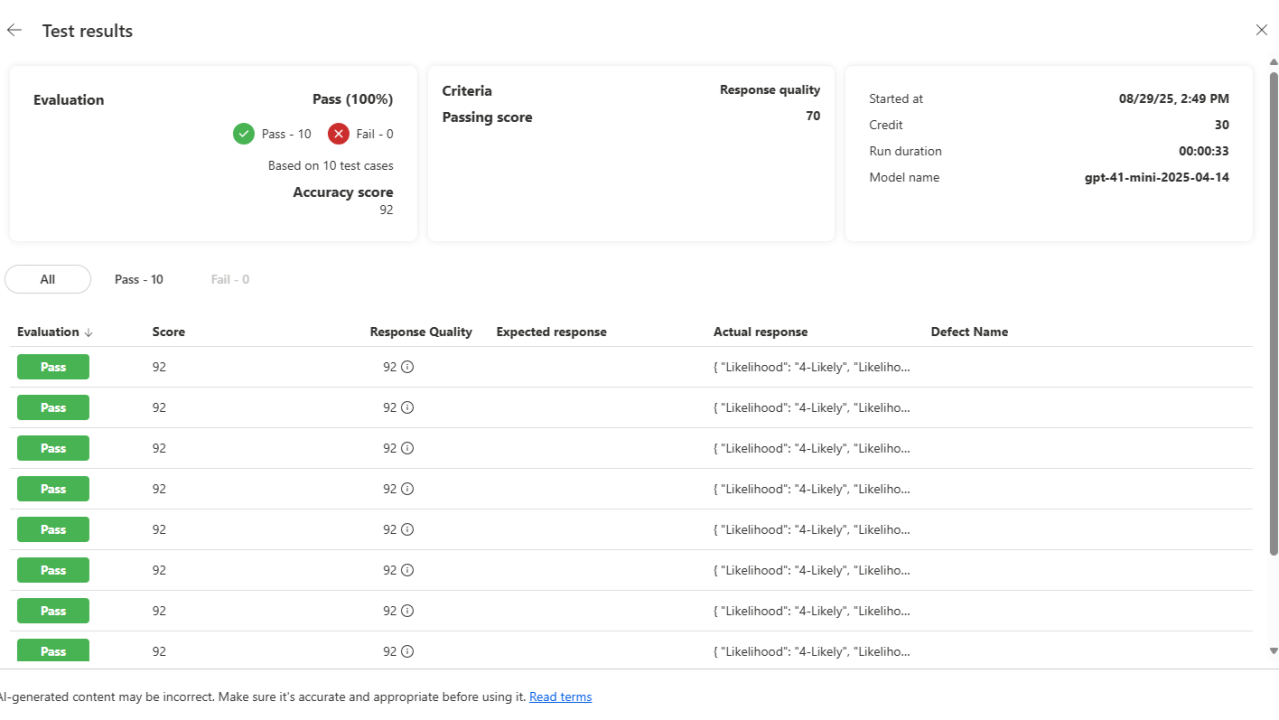
After running your test cases, Test Hub produces a detailed results page that highlights:
- ✅ Pass/Fail status for each case
- 📊 Accuracy scores (e.g., in my example, the prompt scored 92 across all runs)
- 🔍 Response quality evaluation
- ⏱ Run duration and model used

Here, you can see a consolidated evaluation: 100% pass rate across 10 test cases, along with a breakdown of accuracy scores and response comparisons.
One important detail: running these test cases will consume AI credits. It’s worth keeping in mind if you’re planning large-scale validation, so you can balance thoroughness with cost.
Why This Matters
For solution architects, developers, and teams working with prompts in production scenarios, Test Hub brings a few key benefits:
- Consistency: You can validate prompt behavior under a variety of conditions.
- Transparency: Test results give you measurable insights into prompt reliability, rather than relying on gut feel.
- Repeatability: Once you’ve built a set of test cases, you can re-run them whenever you update your prompt, ensuring quality over time.
- Confidence in Deployment: A tested prompt is much easier to trust when publishing to wider audiences.
First Impressions
I haven’t dived too deeply into it yet, but even from this first look, the Test Hub feels like an important step toward lifecycle management for prompts.
Just as software developers rely on unit tests to validate their code, we now have a lightweight but effective way to test prompts before publishing. For large projects, or for organizations building prompt libraries, this could become a vital best practice.
It’s early days, but I’ll definitely be exploring this further to see how it fits into real-world workflows.
👉 Have you tried out the Test Hub yet? I’d be curious to hear your thoughts on how useful you think it will be for managing AI prompts at scale.
Leave a Reply